Solar forecast
The hub can fetch the expected solar production of your roof from Solcast and publish it as a Solar forecast device. Its entities behave like any other sensor: flows can read them ("run the water heater if today looks sunny"), the history records them, and you can read the whole forecast as one document at GET /api/v1/solar, or with the get_solar MCP tool.
The forecast is an estimate, not a meter. The entities carry kWh and kW, but no energy or power device class, so the Energy tab and the energy-role pickers never take them for a measured reading. Measured production comes from your own meter, as before.
Solar is off by default. While it is off, the hub makes no request to anyone.
What you need
- A Solcast account with a hobbyist plan, which allows 10 requests per UTC day and up to 2 rooftop sites.
- A rooftop site configured in the Solcast Toolkit. Its resource id, shown for the site in the Toolkit, is what the hub asks for.
- An API key from the same account.
Turn it on
Open Settings → Solar forecast (or the Solar forecast card in the Services step of the setup wizard), switch Enabled on and fill in:
- API key: your Solcast key. It is stored in the hub's database and is write-only: once saved, the page shows only that one is set, and typing a new key replaces it. Nothing needs copying onto the host.
- Rooftop site ids: one or more rooftop resource ids. Only letters, digits,
-and_are accepted in an id. - Calls per day: this hub's share of the account's daily requests. Keep the default of 10 when the hub is the only tool using the account.
Test (uses 1 call) checks the key against Solcast before you save. Saving restarts the hub. An empty site list, an id with other characters, or a calls-per-day value below the number of sites is refused when you save, with the reason, and nothing is changed.
The home location (see Weather) places the sun for the refresh times below; set it in Settings → Location.
See the Settings reference for the stored fields. An assistant can read and change them with get_settings and set_settings (MCP tools).
Sharing the account with another tool
If another tool polls the same Solcast account, its calls count against the same daily limit. Set Calls per day to the account limit minus what the other tool uses. For example, if another tool makes 2 calls a day, use 8: the hub then has 8 calls, of which 2 stay in reserve, so it refreshes 6 times a day. With two rooftop sites the same budget gives 3 refreshes a day, because each refresh calls both sites.
The hub always keeps 2 calls in reserve for restarts and surprises. If the numbers are off anyway and Solcast answers "quota exceeded", the hub stops calling until 00:05 UTC.
When the hub calls Solcast
The refreshes are spread over daylight:
- One refresh about 30 minutes before sunrise, so the day starts with a morning forecast.
- The others evenly spaced until about an hour before sunset.
- None at night.
Sunrise and sunset come from your home location, the same place your flows use for sun triggers. Without a location the hub uses Paris.
Each refresh keeps the periods of the day that have already passed, so "forecast today" stays the energy of the whole day, not just what is left. The latest forecast and the call count are kept as a retained document on the broker (oikos/solar/cache). A restart reads it back, so restarting the hub does not spend calls.
If Solcast refuses the key (401 or 403), the hub logs one error and stops calling until it restarts. Save a working key in Settings; saving restarts the hub.
Turn the solar forecast on in one hub only per Solcast account and broker. A second hub with it off clears the first one's retained cache, and two enabled hubs share the daily budget badly.
The entities
Entity ids are solar_<key> for the keys below, for instance solar_forecast_today. The device has no room; move an entity to one with the usual override if you want it there.
| Key | Unit | Meaning |
|---|---|---|
forecast_today | kWh | Expected energy for the whole of today |
forecast_today_low | kWh | Today, pessimistic (10th percentile) |
forecast_today_high | kWh | Today, optimistic (90th percentile) |
forecast_remaining_today | kWh | Expected energy from now until the end of today |
forecast_tomorrow | kWh | Expected energy for tomorrow |
forecast_tomorrow_low | kWh | Tomorrow, pessimistic |
forecast_tomorrow_high | kWh | Tomorrow, optimistic |
forecast_power_now | kW | Expected power for the current half hour |
forecast_peak_today | kW | Today's highest expected power |
forecast_peak_time_today | time | When that peak is |
forecast_remaining_today and forecast_power_now are recalculated every 30 minutes from the forecast already held, without calling Solcast, so they keep moving through the day.
Freshness and offline
staleistrueinGET /api/v1/solarwhen a planned refresh has been failing for more than an hour, or when the last success is older than 18 hours. There are no refreshes at night, so a forecast from the evening is not stale the next morning until the 18 hours have passed.- The entities go unavailable when the last success is older than 24 hours, or when no forecast period covers the current time. A flow then sees "unavailable" and not an old number.
- The entities come back on the next successful refresh.
- Turning solar off removes the device on the next start, and the hub clears the retained cache and discovery it left on the broker.
In the web UI
The card. On the house overview, the Solar forecast card sits beside the weather card. It shows:
- a headline with the energy produced today and the forecast for the whole day, for example "2.9 kWh produced · 7.7 kWh forecast";
- a small day curve. The forecast is a light amber area with an outline. Measured production is a line over it, up to now, and a dashed line marks now;
- a bottom line with the end-of-day projection ("≈ 5.6 kWh by tonight": what is measured plus what the forecast still expects) and tomorrow's forecast with its low–high range, for example "Tomorrow 10.7 kWh (7–11)". The projection is left out once less than 0.05 kWh is left.
Click the card to open the solar page. The card is hidden when the hub has no forecast or the forecast is more than 24 hours old. When the forecast is stale but less than 24 hours old, the bottom line says "Data from HH:MM". On a phone the two cards stack, and the curve becomes a thin strip.
Measured or forecast. Measured production comes from the entities whose energy role is Solar, set in the entity's settings as for the Energy tab. Several are added together, and Invert is honoured. When their kWh counters exist, the "produced" figure is the same as on the Energy page.
When there is no solar entity, or history is off, nothing is measured. The headline then reads "≈ 1.2 kWh so far", which is the forecast up to now and not a measurement, and the curve shows those hours as a faint fill instead of a line.
The Solar page
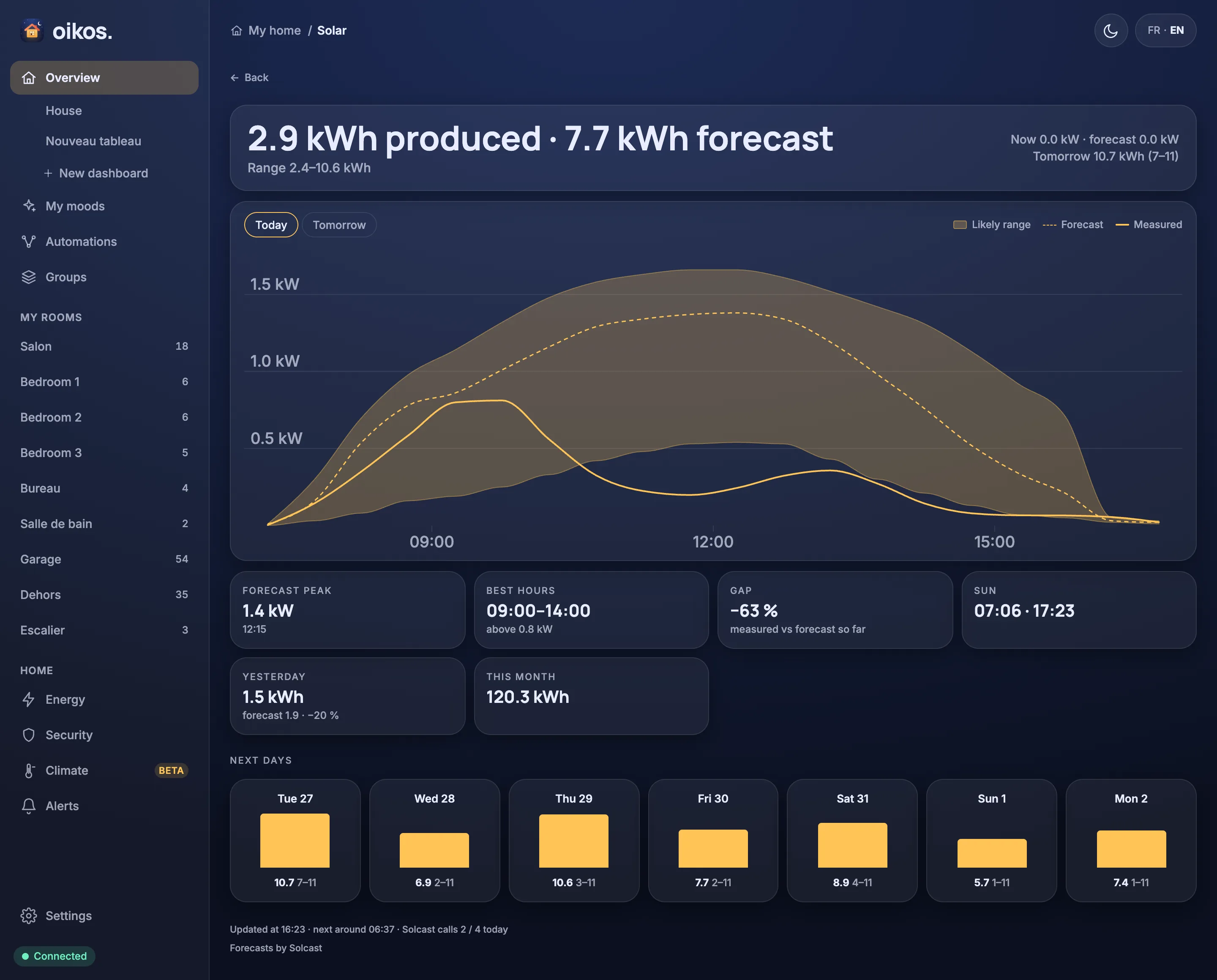
Open it from the card, or at /solar. A Back link leads out. The page has:
- a headline card with the produced and forecast energy for today (the same headline as the card), and the likely range ("Range 2.4–10.6 kWh") under it. On the right, power now measured against forecast ("Now 0.0 kW · forecast 0.0 kW"), then the end-of-day projection and tomorrow, as on the card;
- a curve card with Today and Tomorrow chips and a legend. The curve has a shaded Likely range band, a dashed Forecast line, a solid Measured line, a kW axis and hour ticks. A dashed vertical line marks now. While nothing is measured, the legend says Estimated so far for the faint fill. Tomorrow shows the forecast and its range only;
- tiles:
- Forecast peak: today's highest expected power and when.
- Best hours: the longest run at or above 60 % of today's peak, with that floor ("above 0.8 kW").
- Gap: measured against forecast so far, in percent.
- Sun: sunrise and sunset, from your home location. Hidden while no location is set.
- Yesterday: measured against the first forecast made for that day, with the gap. A forecast made more than an hour after sunrise is shown as "forecast at HH:MM".
- 7-day accuracy: the mean error of the morning forecasts, as "± N %". It needs at least 3 days with a morning forecast above 0.5 kWh.
- Roofs: each rooftop's forecast for today ("Roof 1 5.1 · Roof 2 7.3"), only with two or more rooftop sites.
- This month: production since the 1st.
- Next days: up to seven day cards starting tomorrow, each with a bar and the forecast with its low–high range ("10.7 7–11"). Only days the forecast covers completely are listed;
- a footer with the update time, the next planned refresh and the Solcast calls used today ("Updated at 16:23 · next around 06:37 · Solcast calls 2 / 4 today"), "Data from HH:MM" when the forecast is stale, and "Forecasts by Solcast".
Each tile hides when its data is missing. Gap, Yesterday, 7-day accuracy and This month need measured production, so they need a Solar-role entity with history.
With solar disabled, the page says that the forecast is unavailable, and to turn it on in Settings → Solar forecast with the API key and a rooftop site.
Flow idea
"If the forecast for today is above 15 kWh, turn the water heater on at 11:00":
- A schedule trigger at 11:00.
- An if check:
solar_forecast_todayis above 15. - A command on the water heater's switch, to on.
Build it in the flow editor, or with set_flow through MCP. See Flows for the nodes.
Privacy
While the solar forecast is enabled, the hub sends the rooftop resource ids and the API key to Solcast, once per planned refresh. Solcast sees your public IP address, as any web service does. Nothing else leaves the house: no device names, no entity states, no address. While solar is disabled, nothing is sent.
Credit
Forecasts by Solcast.